DHI-Plus Edge: Release Notes
New features are on the way to deliver an even more seamless mobile solution for real-time animal management.
Recent Updates
V. 1.29.1.1
Released June 22, 2024
Vet Check Input Fixes
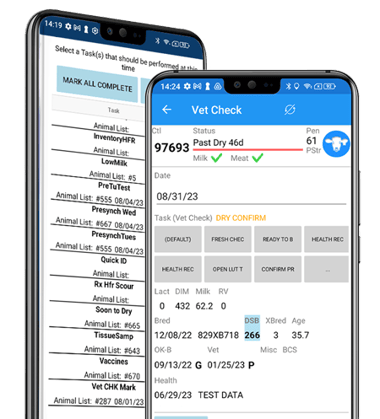
Version 29 includes important fixes for the Vet Check Input. The fixes include:
- DSB on Vet Input screen now displays properly.
- Improved handling of updates that create Ver Con breeding from a recorded pregnancy.
V. 1.25.1.1
Released May 28, 2024
Files Backup Location
After the DHI-Plus Edge app is updated you will be prompted to choose a backup location for your pending updates.
Note: If your device supports an SD card, it’s recommended to back up your DHI-Plus Edge files to the SD card. The benefit of this is that the card can be removed from the device if it stops working or is damaged. For any questions regarding the SD card, please contact Amelicor. If an SD card is not available, choose a folder on the device as the backup location.
You can name the backup folder "EDGE" or something descriptive, indicating it's the DHI-Plus EDGE backup folder.
After selecting a location, tap "Allow" to grant Edge access to the new directory. The app will then return to the Edge Sync Settings screen and be ready to use.
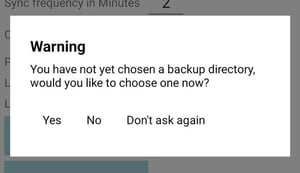
Tap Yes to choose the backup folder location.
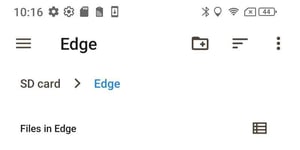
In this example, a directory folder on the SD card was named "Edge."
Main Menu Additions
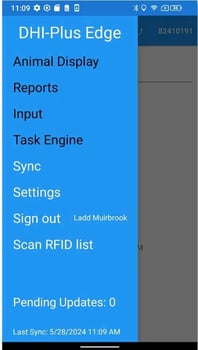
You can now access the Sync screen directly from the menu screen.
Additionally, the number of pending updates since the last sync is visible from the menu screen.
New User Settings Options
To access User Settings, tap the app menu (the three bars at the top left of the app), select Settings, and then tap User.
Note: User settings are unique for each user.
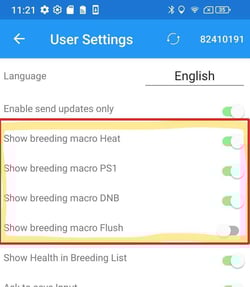
- Enable Send Updates Only: This option allows the user to send updates only during a sync, which is useful when syncing multiple devices. It reduces the sync time for updates only and lets the user choose to receive updates from the desktop after all device updates have been synced.
- The Send and Receive button allows updates entered on the EDGE device to be sent to the cloud and updates from the DHI-Plus desktop to be received from the cloud when the sync is started.
- Show Breeding Macros: This option can be toggled on or off, allowing the user to select which breeding macros are needed for the Input Breeding screen.
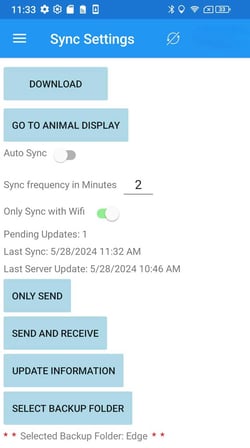
The Only Send updates button appears on the Sync Settings screen if the "Enable Send Updates Only" option is enabled.
New Auto-Sync Feature
A new feature in the App automatically syncs pending updates when a user chooses to download data. This ensures that no pending updates are missed when refreshing data files from DHI-Plus desktop to Edge.
Reminder: The download function replaces the whole database of DHI-Plus files.
Note: Previously, the user would be warned to sync pending updates, but there was a chance of losing updates if it was skipped.
Breeding
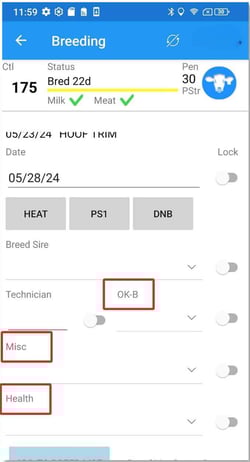
There are some new fields in the breeding screen to capture additional data:
- OK-B
- Misc
- Health